Instructors Version Logo
latest

Nano Degree Program

  • Experience the Technology of the Future and Coding
  • Overall Lecture Explanation
  • Coding Practice for Experience
  • Robot Coding Practice
  • Introductory Mission

Coding Practice for Experience

  • Day One Lecture
    • Operating Robot via Joystick
    • Robot Play on the Map
    • Let Us Try to Assemble
    • AI Training Examples
    • Get to know your Robot
  • Day Two Lecture
    • Robot Drive (Joystick vs Coding)
    • Get to know your Robot
    • AI Training Examples
  • Day Three Lecture
    • Manually Driving vs Autonomously Driving
    • Assembling the Robot
    • Get to know your Robot
    • AI Training Examples
  • Day Four Lecture
    • Team Competition
    • Source Code Explanation
  • Day Five Lecture

Robot Coding Practice Day 1

  • Robot Controls Examples
    • Introduction
    • ROS Topic Examples
      • Follow Along!
        • ROS Topic Publisher
        • ROS Topic Subscriber
      • Explanation
        • Topic
        • Nodes
        • Publisher
        • Subscriber
    • ROS Sensors Examples
      • Follow Along!
        • IMU
        • LIDAR
      • Explanation
        • IMU
        • LIDAR
    • Mission
      • Accessing Isaac Sight
      • Checking Visuals
    • Discussion
    • Q&A session
  • AI Image Recognition Examples
    • Introduction
    • AI Image Recognition using GoogleNet
      • Follow Along!
      • Overall Explanation
        • Overview
        • GoogleNet
      • Coding Explanation
      • Mission
      • Discussion
    • AI Image Recognition using AlexNet
      • Follow Along!
      • Overall Explanation
        • Overview
        • AlexNet
        • How are GoogleNet and AlexNet?
      • Coding Explanation
      • Mission
      • Discussion
    • Mission Project
      • Writing Python Program as a Team
    • Q&A session
  • Driving the Robot Examples
    • Introduction
    • Follow Along!
      • Movement Instructions
      • Movement with Odometry Information
    • Explanation
      • Odometry Information
    • Coding Explanation
      • Robot Movement
        • Initialization
        • Sending commands
        • Combining the movement instructions to a single python function
      • Odometry Information
        • Odometry calculation
        • Starting the Calculation
    • Mission Project
    • Discussion
    • Q&A session
  • SLAM and Navigation
    • Introduction
    • Basic Features
      • 1. Map
      • 1. Pose of Robot
      • Sensing
      • Path Calculation and Driving
    • Theory
      • Slam Theory
        • Particle filter
      • Navigation Theory
        • Costmap
        • AMCL
        • Dynamic Window Approach (DWA)
    • Mission
      • Constructing a Map (as a Team)
      • Mapping the Constructed Map
      • Executing Navigation
      • Team Competition
    • Discussion
    • Q&A session
  • Robot Arm
    • Follow Along!
      • Basic Robot Arm Control
        • Moving the Robot Arm
        • Read Servo Motor Angle
        • Controlling Servo Motors
        • Dancing with the Robot Arm
        • Robot Arm teaching
        • Gripper Control
      • Advanced Robot Arm Control
        • Tracking a Color with the Robotic Arm
        • Tracking a Face with the Robotic Arm
        • Dancing With Music!
    • Overall Explanation
      • Robot Arm Movements
      • Tracking a Color or a Face
      • Sound
    • Code Explanation
      • Robot arm Movements
      • Basic Movements
      • Reading the Current Angle of the Servo
      • Teaching the Robot Arm
      • Tacking a Color or a Face
        • Tracking a Color
        • Tracking a Face
    • Mission Project
      • Libraries used for this Mission
        • mission_lib custom Library
        • event_name custom Library
      • Lets Start the Mission!!!
      • Pick up an object and place it somewhere else!
    • Discussion
    • Q&A session
  • Computer Vision
    • Exercises Using RealSense Depth Camera
      • Follow Along!
        • Exercise 1: ASCII Depth Representation
        • Exercise 2: OpenCV and Numpy integration
        • Exercise 3: Align Depth with Color
        • Exercise 4. Advanced Mode
      • Depth Camera Theory
      • Code Explanation
      • Discussion
      • Q&A session
  • Digital Twin
    • Follow Along!
      • Initialization
        • Import the Virtual Environment and the Robot
        • Test the Virtual Movements
      • Navigation
    • Explanation
      • Initialization
        • Robot Tuning
        • Robot Driving
      • Action Graph
      • Universal Scene Description
      • Navigation
        • Occupancy Map
      • Warehouse Navigation
        • Prerequisite
        • The ROS Navigation Setup
        • Running ROS Navigation
    • Discussion
    • Q&A session
  • ChatGPT
    • Sample
    • Methods
    • Limitations

Robot Coding Practice Day 2

  • Robot Controls Examples
    • ROS Command Examples
      • Follow Along!
        • ROS Command Example
        • ROS Service Server
        • ROS Service Client
      • Explanation
        • ROS Command Line
        • ROS Service
    • ROS Sensors Examples
      • Follow Along!
        • Camera
        • Sonar
      • Explanation
        • Camera
        • SONAR
    • Mission
      • Accessing Isaac Sight
      • Checking Visuals
    • Discussion
    • Q&A session
  • Pose/Gesture Estimation Examples
    • Follow Along!
    • Overall Explanation
      • Overview
      • Pose-ResNet18-Body
        • Residual Blocks
    • Coding Explanation
      • Major Functionalities
      • Minor Functionalities
    • Mission
      • Writing Custom poseNet Program
      • Executing the Custom Program
      • Let’s Change the Overlay!!!
    • Discussion
    • Q&A session
  • Object Detection with SSD-Mobilenet-v2
    • Follow Along!
    • Overall Explanation
      • Overview
      • SSD-Mobilenet-v2
      • Other models for Object Detection
    • Coding Explanation
      • Major Functionalities
      • Minor Functionalities
    • Mission
      • Writing Custom detectNet Program
      • Executing the Custom Program
      • Let’s Change the Overlay!!!
    • Discussion
  • Driving Games of the Robot
    • Follow Along!
    • Explanation
      • Odometry Information
    • Coding Explanation
      • Robot Movement
    • Mission Project
    • Discussion
    • Q&A session
  • Autonomous Games
    • Introduction
    • Basic Features
    • Theory
    • Mission
    • Discussion
    • Q&A session
  • Robot Arm
    • Follow Along!
    • Overall Explanation
    • Code Explanation
    • Mission Project
    • Discussion
    • Q&A session

Robot Coding Practice Day 3

  • Robot Controls Examples
    • ROS Command Examples
      • Follow Along!
        • ROS Command Example
        • ROS Service Server
        • ROS Service Client
      • Explanation
        • ROS Command Line
        • ROS Service
    • ROS Sensors Examples
      • Follow Along!
        • Camera
        • Sonar
      • Explanation
        • Camera
        • SONAR
    • Mission
      • Accessing Isaac Sight
      • Checking Visuals
    • Discussion
    • Q&A session
  • Sematic Segmentation Examples
    • Follow Along!
      • CityScapes
      • Outdoor (off-road)
      • Segmenting Human Images
      • Variaty Objects and People
      • In-Doors
    • Overall Explanation
      • Overview
      • FCN-ResNet18
        • Convolutionalizing
    • Coding Explanation
      • Major Functionalities
      • Minor Functionalities
    • Mission
      • Writing Custom segNet Program
      • Executing the Custom Program
    • Discussion
  • Driving Games of the Robot
    • Follow Along!
    • Explanation
      • Odometry Information
    • Coding Explanation
      • Robot Movement
    • Mission Project
    • Discussion
    • Q&A session
  • Autonomous Games
    • Introduction
    • Basic Features
    • Theory
    • Mission
    • Discussion
    • Q&A session
  • Robot Arm
    • Follow Along!
    • Overall Explanation
    • Code Explanation
    • Mission Project
    • Discussion
    • Q&A session

Robot Coding Practice Day 4

  • Place Holder

Robot Coding Practice Day 5

  • Place Holder
Instructors Version
  • Digital Twin
  • Explanation
  • Navigation
  • Edit on GitHub

Navigation

For a navigation system, the robot must be able to identify the environment, locate itself in relation to the environment and travel to the goal position whilst avoiding obstacles.

For self driving algorithm we utilize AMCL and virtual sensors. Most of the nodes and ROS Navigation Setup is already set up. Here is the block diagram showing the ROS messages required for the navigation stack.
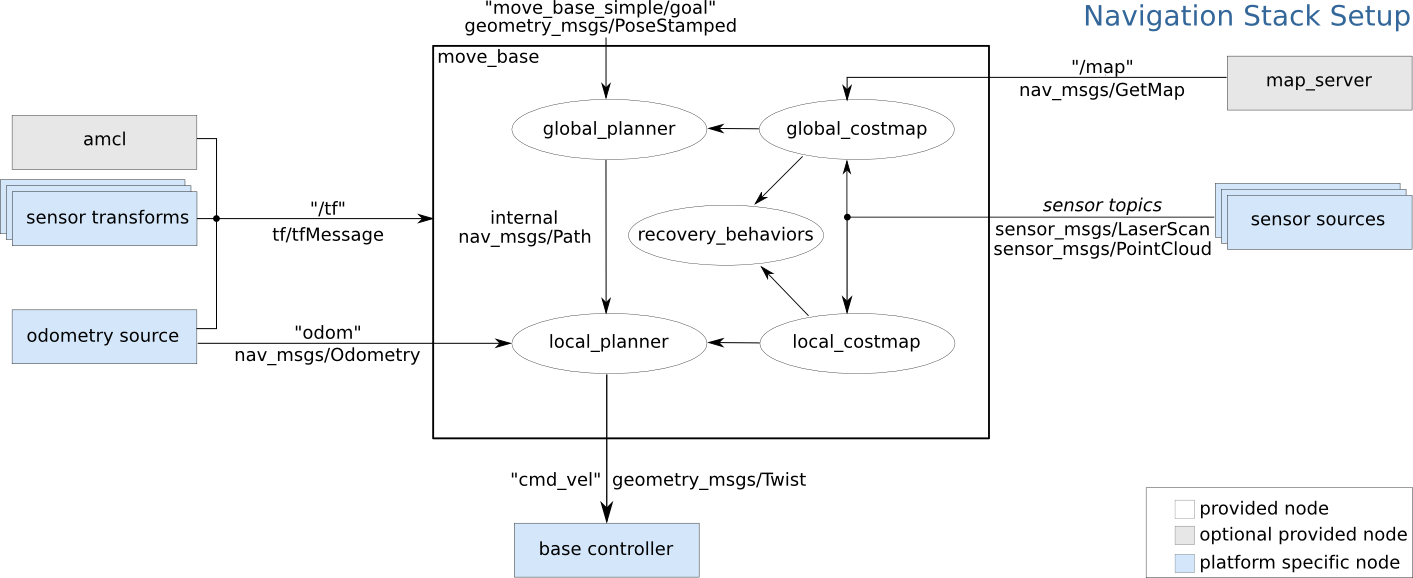
For navigation system located on our actual zetabot, we use SLAM AMCL to first initialize the map and ourselves in prespective of the map. However for our virtual environment, it is recommended to provide an occupancy map before the navigation task.

Occupancy Map

In order to create a Occupancy Map:

  1. Open the Occupancy Map Window (Isaac Utils -> Occupancy Map)

  2. Set the Origin axis to 0: X: 0.0, Y: 0.0, Z: 0.0

  3. Set the Z values of the lower and upper bound: Upper bound = Z: 0.62, Lower bound = Z: 0.1

  4. Select document variable in the Stage window and click BOUND SELECTION in the Occupancy Map window. This will automatically set the X Y variables of the Upper and Lower Bounds.

    (NOTE) If some components within the map does not have any weight value, it might cause error in the following executions.

  5. Click the CALCULATE followed by the VISUALIZE button. This will calculate the occupance map and visualize the calculated map.
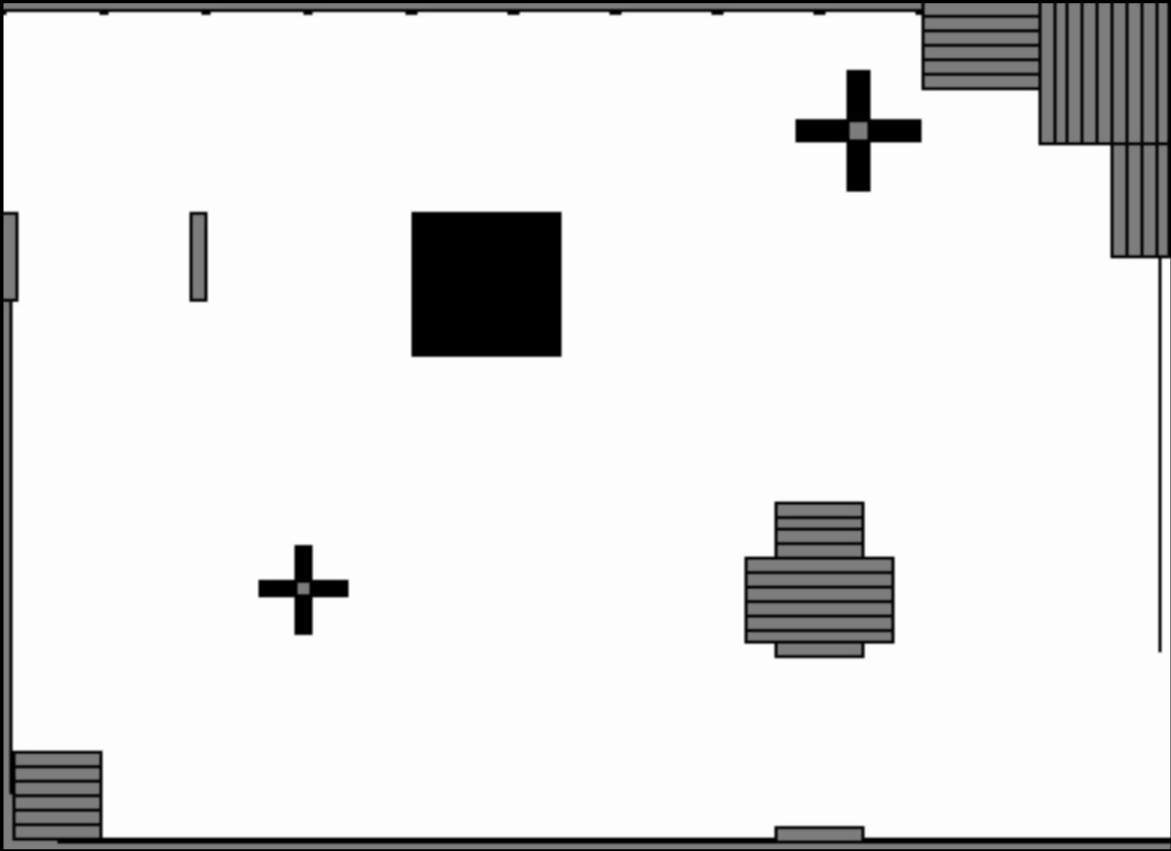
  1. Rotate the image to fit match the simulated angle.

  2. Create a Yaml file within the Map directory (for our application the map directory is located in /home/zetabank/dev_ws/src/zeta_navigation/zeta_2dnav/map), and copy the the text file generated. Example:

    image: zeta_map1_navigation.png
    resolution: 0.01
    origin: [0, 0, 0]
    negate: 0
    occupied_thresh: 0.65
    free_thresh: 0.196
    
  3. Save the occupancy map in the map directory.

  4. Open the /home/zetabank/dev_ws/src/zeta_navigation/zeta_2dnav/launch directory, and create a .launch file that follows these form:

    <launch>
        <param name="use_sim_time" value="true" />
    
        <!-- Load Robot Description -->
        <arg name="model" default="$(find zeta_description)/urdf/zeta_220922.urdf"/>
        <param name="robot_description" textfile="$(arg model)" />
    
        <!-- Run the map server -->
        <node name="map_server" pkg="map_server" type="map_server" args="$(find zeta_2dnav)/map/name of the yaml file.yaml" />
    
        <!--- Run AMCL -->
        <include file="$(find amcl)/examples/amcl_diff.launch" />
    
        <!-- starting position of the robot>
        <param name="/amcl/initial_pose_x"  value="3.5"/>
        <param name="/amcl/initial_pose_y"  value="0.4"/>
        <param name="/amcl/initial_pose_a"  value="-3.14"/>
    
    
        <node pkg="move_base" type="move_base" respawn="false" name="move_base" output="screen">
            <rosparam file="$(find zeta_2dnav)/params/costmap_common_params.yaml" command="load" ns="global_costmap" />
            <rosparam file="$(find zeta_2dnav)/params/costmap_common_params.yaml" command="load" ns="local_costmap" />
            <rosparam file="$(find zeta_2dnav)/params/local_costmap_params.yaml" command="load" />
            <rosparam file="$(find zeta_2dnav)/params/global_costmap_params.yaml" command="load" />
            <rosparam file="$(find zeta_2dnav)/params/base_local_planner_params.yaml" command="load" />
        </node>
    
        <node type="rviz" name="rviz" pkg="rviz" args="-d $(find zeta_2dnav)/rviz/zeta_2dnav.rviz" />
    </launch>
    
    • Launch files are .launch formatted specific XML files. It is used to organize and initiate multiple exectutions within a workspace directory.

      The contents of the launch file must be contained in a launch tags.

      <launch> ... </launch>
      
    • Nodes are started with <node> tags where the arguments pkg, type and name must be provided.

      <node pkg="..." type="..." name="..." respawn=true ...>
      
    • We can see that, when we are importing our map, we are specifying the location of the map at the args arguments:

      <!-- Run the map server -->
      <node name="map_server" pkg="map_server" type="map_server" args="$(find zeta_2dnav)/map/name of the yaml file.yaml" />
      
    • We can also notice that we are initializing the starting position of our robot (within the map)

      <!-- starting position of the robot>
      <param name="/amcl/initial_pose_x"  value="3.5"/>
      <param name="/amcl/initial_pose_y"  value="0.4"/>
      <param name="/amcl/initial_pose_a"  value="-3.14"/>
      
  5. To activate the navigation task, execute the launch file with the following command. (Make sure to open a new terminal)

    roslaunch zeta_2dnav zeta_navigation.launch
    
Previous Next

© Copyright . Revision e673aa49.

Built with Sphinx using a theme provided by Read the Docs.